Correspondence templates with placeholders

For the individual handling, creation and editing of correspondence, the CRM provides functions that offer you new possibilities in customer communication:

  • New correspondence template type for creating formatted serial and single emails with placeholders for personalization.
  • Find templates quickly using structured filing (area/topic) and labeling of templates as favorites.
  • As a non-template administrator, use the simplified correspondence template management for end users

In the standard, JustRelate delivers from CRM version 7.5 two correspondence templates to use for serial and single emails.

Info

Admin: The templates bring along a set of common placeholders via the loader, which can be adjusted in Customizing.
You can use a Loader formatting to link fields. This makes it possible to link individual fields that you need, for example, for the form of address or a signature, and to remove unnecessary blanks if not all fields are filled, for example, if the title or name affix is empty. In this way, for example, a placeholder for the CMP name can be included without the form of address.
In this case the formatting is: C:CAT: :TIT_NAM,FST_NAM,ADD_FST_NAM,NAM,ADD_NAM.

  • E-Mail: HTML template with signatur (German, PISA) ID = PSA_RPT_CPD_EML_PLH
  • E-Mail Serie: HTML template with signatur (german, PISA) ID = PSA_RPT_CPD_EML_SER_PLH
  • Both templates use the loader PSA_RPT_CPD_HTM_EML.
  • In the metadata the Parameter TOP_DTO:=CORRESPONDENCE REC_DTO:=PSA_CON_ACT_CLI_SAG represents the relations.
  • PiSA is entered as the Tool.

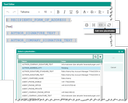
HTM editor with placeholder template and placeholder selection

Note: The new editor with placeholder functionality is only available in the web client. The Windows cli­ent does not have a new editor. Please also note the following:

  • The placeholder functions are only available on serial and single email, not at other activities.
  • Placeholder functions are only available at emails with HTM template. If a non-HTM template (BIRT, WWD) is selected, they are disabled.
  • Placeholders are only filled with data from the referenced field. No logic beyond can be executed.
  • Placeholders are formatable (text size, text color, background color...).
  • In single emails, it only makes sense to use placeholders that reference 1:1 linked data, e.g. project subject, project number, etc. In placeholders that are based on linked lists, e.g. RECIPIENT_..., only one recipient is selected/entered.
  • In serial mails, it must be ensured that the content of the HTML text field
  • a)is inserted as a text block in the template as before when using non-HTM templates (BIRT, WWD),
  • b)represents the whole mail text when using the HTM templates.
  • After making changes in the data (e.g. recipient), you can update already filled placeholders by click­ing the Refresh icon next to the placeholder selection.
  • The function Use template also offers to refresh the placeholders.
Attention

Attention: The placeholder selection only shows the placeholders that really contain data. If, for exam­ple, the automatic creation of a signature is not defined in "My data", then the placeholder [AUTHOR_SIGNATURE_TEXT] is also not displayed for it.

See also: End users (non-template administrator) can use the Simplified correspondence template management. There you can find a compact Quick info for the simplified correspondence template as a PDF document.

Admin: Generate HTML content for e-mail templates  

When generating emails with the BIRT reporting tool, HTML content with images may not be displayed correctly in Outlook because Outlook expects image sizes in pixels, but the reporting tool provides centimeters.

Info

For own BIRT templates with images, we suggest therefore:

A conversion can be activated at the template using the new parameter CNV_IMG_DIM. Values are:

  • sty: Within the style attribute the units cm, mm, in and pt are converted to px for width and height.
  • att: Width and height are converted, but not written back into the style attribute, but created as extra attributes.

Outlook expects the dimension as attributes. So for a correct display, att is to be used. sty is only meant as an option if you need CSS styles for another use case. Example:

<img src="" style="width: 4.77cm; height: 1.08cm;">
Using "sty", this becomes:
<img src="" style="width: 180px; height: 41px;">
Or, using "att", it becomes:
<img src="" width="180" height="41">

NoteAs an alternative to the template parameter, the session Value Buffer or the PSA_BIRT_RPT_CNV_IMG_DIM environment variable can be set. See also Tools to control BIRT reports.