Tasks

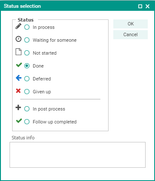
Task status

 Task status

A task follows either the workflow of a given process, or it is declared a personal activity. The Deadline, Period and Priority are specified when a task is created. Using the Series type dialog, a workflow with a Series pattern and Series duration can be created to specify, e.g., a reminder pattern.

Tasks can be Delegated, if required, by changing the Responsibility. The task Status is also automatically changed. The staff member receiving a delegated task can accept or reject it.

The reference to processes and persons is created automatically when an activity is created from the corresponding form, or can be defined via the selection dialog.

Status

Comment

Not started

After creating a task, it is saved to the database as not started.

In process

The activity is in process, depending on its duration. The completion time lies in the future.

Done

The activity is completed. The completion time lies in the past.

Waiting for some­one

The creator of the activity waits for assistance or a reaction of a staff member. For exam­ple, the "Done" status is expected for a higher-level activity.  A reminder may be required here.

Deferred

The activity is deferred by the user. A reminder may be required here.

Given up

The task is not pursued any longer.

Delegated

The responsibility of the task was transferred to a different staff member.

In post-processing

Follow-up activities may have been created for the activity. The status can be set manu­ally if there are follow-up activities. See also Follow-up activities.

Post-processing completed

The activity including its follow-up activities is completed.