Sales

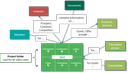
Relations between sales cases and other objects

The sales module lets you manage all project folders and sales cases separately as Opportunities, Quotes and Orders. With its project folder, JustRelate CRM offers a central collecting point and a roof for the data of your sales cases.

Thanks to a direct connection with Microsoft Office applications, you can quickly process data for printing documents such as quotes, standard letters, calculations or mailing. All sales cases can be passed to MS Project as the case management tool.

Opportunities (all inquiries)

  • Manage customer inquiries
  • Manage inquiries of potential prospective customers
  • Establish contact potential and qualify contacts
  • Capture competitors of a product or service
  • Configure products to suit customers
  • Create and manage commodity lists
  • Create forecasts oriented towards turnover

Quotes

  • Create and manage quotes
  • Develop price and product information
  • Manage price variants and product versions and create comparisons
  • Configure products and services client-specifically
  • Create and manage commodity lists
  • Deepen contacts and develop solid customer relationships
  • Manage and display competitors of a product or service
  • Create forecasts oriented to turnover
  • Edit calculation, final costing and progress control
  • Process and send quotes product- and case-specifically

Orders

  • Create and manage orders
  • Develop price and product information
  • Manage price variants and product versions and create comparisons
  • Configure products and services client-specifically
  • Create and manage commodity lists
  • Deepen contacts and develop solid customer relationships
  • Manage and display competitors of a product or service
  • Create forecasts oriented to turnover
  • Edit calculation, final costing and progress control

You can create different sales cases from the business opportunity to the order and schedule activities necessary for the qualification of the project (project folder). You can collect all sales cases of a project in the project folder. Furthermore, you can qualify the project by means of activities, depending on or independently of the individual sales cases.

All open activities of a project are displayed in the Entry Portal of the assigned agent.

A business opportunity is qualified as a quote or an order through other measures, for example by replying to an inquiry (letter, mail), establishing a contact, recording product and service potential, capturing competitors or tracking opportunities. A sales operation can be transferred to a higher or another version at any time at the push of a button.