The document management tools JustRelate CRM offers enable you to manage and access all types of documents and files. The documents that can be managed with JustRelate CRM are not only those that were created electronically (Excel tables, CAD models, CAD subscriptions, layouts, presentations, text documents etc.), but also manually (scanned paper templates, PDF documents from the technical documentation). The document management integrates mechanisms for the server-driven preparation of documents. This makes it easy to create documents related to one or several contacts without having to leave the CRM.

Documents and briefcases
The documents and files you need for the sales cycle and for your correspondence are managed in the "Document Management" module. All documents and files are managed as so called BLOBs (Binary Large Objects) in the database. The document management offers a document list for every contact, business relation or product/service. It contains all documents that are assigned to contact persons, sales cases, orders, quotes and products, and supports a multitude of document types.
Documents can be created in the contact or the case management. You can also directly access the document management from there.
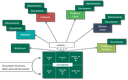
Relations between documents and other objects
Note: You can create letters, standard letters, faxes or emails as correspondence activities to be passed to selected addressees. These documents are maintained as activities (correspondences) and are not directly a component of the document management.
All documents are saved securely in the database. The availability of the documents is controlled by means of Validity and Status functions. This way, the CRM ensures that a document cannot be edited by several persons at the same time, and that the latest document version is always available.
MS 365 and OneDrive
After having become familiar with the basic way of working with documents, consider taking a look at all the important information about working with documents in MS 365 and OneDrive: MS 365 integration