In the Team Calendar, all appointments and phone calls of internal employees are displayed as interactive bars. Every internal staff member can specify whether another staff member can view the activities, create new ones, or modify existing ones. The Team Calendar thus enables people in charge, planners, project managers, and team leaders to access other staff members' calendars, making it very easy to recognize and efficiently coordinate the availability of employees and technical resources.

Team Calendar
See also: Team Calendar
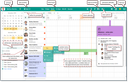
Interactive Team Calendar
Tip: In the Team Calendar, you can comfortably create, move, and resize appointments, as well as interactively assign people and resources using your mouse cursor.
- Create appointments by holding the CTRL key and dragging right for the desired time interval.
- Move appointments using the mouse + Shift key.
- Change the appointment duration using the mouse + Shift key.
- Assign people and resources by drag-and-drop of the appointment to the respective row + Shift key.