You can integrate third-party calendars visually into the CRM calendars via an ICS file, a subscription URL, or with the help of an integrated holiday library.

Integrating third-party calendars
Note: Appointments are not imported and cannot be edited like classic appointments in the CRM.
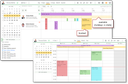
Integrated third-party calendar
Third-party appointments are displayed in the CRM calendars as virtual appointments and are taken into account by the conflict checking and appointment finding functions, depending on their booking status (free/booked). This allows you to better take into account your own availability or the availability of other people (e.g., employees of a subsidiary in another federal state or abroad) when scheduling appointments.
In My data/Additional data/Foreign calendars you can select administratively predefined third-party calendars (field selection) and add your own ones.
All kinds of third-party calendars can be integrated that provide ICS files, e.g., your own Google, GMX, Outlook calendar, etc., or booking calendars and so forth for your own availability as well as holidays in other states.
You can use the following sources:
- Add file: Load an ICS file.
- Add URL: Regular internet access to an ICS file via a URL. The update interval is selectable.
- Add holidays: Calculation of holidays with the help of the "JollyDay" library. The country and region are selectable. When selecting a region, region-specific public holidays are added.
You can overload a booked or free indicator brought along by the external calendar by setting the flag in the Free field (in My data). The preview function in the My Data subdialog opens a list with all appointments of the third-party calendar.
Deleting a third-party calendar configuration in My Data also removes the third-party calendar appointments from the calendar.
Third-party calendar appointments as virtual appointments
For virtual foreign calendar appointments, the context functions of CRM activities are deactivated.
Interactive change attempts (length, positioning on the timeline) are rejected.
A regular appointment can be added to a virtual appointment in the calendar with [Ctrl + mouse button].
The presentation is predefined by the rules of the personal or team calendar (all-day, not all-day, booked, free).
Third-party calendar appointments are displayed in yellow (adjustable via the variable PSA_CLR_FRN_CLD). This color is not automatically used in the personal calendar when you add people.
If several third-party calendars with similar or identical dates are linked, e.g. Whitsun from both the public holiday calendar for Germany and the public holiday calendar for Poland, Whitsun is only displayed once in the calendar. However, this only works if the dates are clearly identifiable. This is the case when using the JollyDay library.
In the QuickView of the third-party calendar appointment, in addition to the subject, there is also a reference to the calendar from which the appointment originates. In QuickView you have to expect commercial advertising from the calendar provider.

Admin: Third-party calendars can be defined globally and made available to users for selection via the Administration/Activities/Foreign calendars menu.
- The administrator can see when users have integrated calendars for themselves. This affects all available or created calendars.
- The list provides functions to update and preview appointments, delete, import and download an ICS file locally.
- Calendar subscriptions via URL are updated according to the cron job definition in the Minute ... Weeks fields. These fields are automatically set by selecting the update period with the calendar definition via "Add URL".
- The Function "Foreign calendar" in the User administration is used to provide calendars for individual users. The function can be used and parameterized in templates, e.g., to assign a third-party calendar when creating a new employee in a department.
The function is not mandatory in the user administration and is not evaluated in the progress check (traffic light).
Enhancements for the integration of external calendars can be implemented through customizing. For example, absences from the “Personio” personnel management system can be displayed in the CRM via iCal. A filter can be added via customizing that recognizes your own name and only displays these own appointments in the calendar. Your JustRelate project engineer will be happy to help you if required.
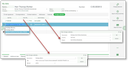
Integrating third-party calendars