Marketing

The marketing module lets you manage all your marketing actions, divided into Telemarketing, Publications and Events. You can immediately plan and access all pending operations and resources via the individual operations of the workflow defined in the process definition. JustRelate CRM thus works as a central collecting point for your data.

Thanks to a direct connection to Microsoft Office applications, you can process data quickly for printing docu­ments like standard letters or mailings. All marketing actions can be transferred to the project manage­ment tool MS Project.

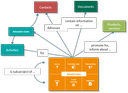
Relations between marketing actions and other sales-relevant objects

One or several organizational contacts, agents and external contacts as well as documents and of course activities are usually assigned to a marketing action. Marketing actions combine all activities and allow you to coordinate activities and define attendee statuses.

Budget planning and cost control

In budget planning, the total budget per year can be specified, and the planned project folders (cam­paigns) assigned. In the assignments, budget, costs and cost deviations are indicated. The budget and the costs (expenses) of the individual campaigns are summed up and reported, so that they can be com­pared to the available total budget.

Note: The term "campaign" is used consistently for the project folder of the budget. "Campaign" as a synonym for telemarketing or similar offensives is not used in the con­text of the system.

Attendee status

The status of contacts can be defined, with comprehensive activity management and action-related attendee status, particularly via telemarketing, and a relevant analysis can be created. If an external contact is involved in a marketing action in which attendee statuses were defined (telemarketing or event), the assignment of an attendee status is offered when creating and changing activities in this con­tact, next to querying the assignments. The corresponding analysis later shows the ratio of external contacts to the attendee status, e.g., the contact status in the action and thus the status of this action.

For marketing actions, a budget can be managed.

Telemarketing

With telemarketing actions, you can organize marketing offensives.

  • Register contacts
  • Create and manage mailings
  • Manage existing customers
  • Sell new products or services
  • Invite to events
  • Trigger measurable responses
  • Controlling via check list
  • Controlling via attendee status (milestones)
  • Monitor follow-up operations

JustRelate CRM supports your offensives by giving you the opportunity to automate and customize many procedures. In telemarketing, you can create and manage marketing actions that are in the offensive phase. Standard activities for telemarketing transferred from the sales case management are pro­cessed step by step by assigning contacts, thus creating a contact list and, finally, automatically creat­ing correspondences by means of the correspondence management. Additional activities can be specified directly at any time or be added to the standard activities.

Publications (newsletters)

Publications are all marketing actions with which operations for distribu­ting information are organized.

  • Register subscribers
  • Manage existing contacts
  • Create and manage newsletters
  • Distribute information on new products or services
  • Publish editorial articles

With this type of marketing actions, intended publications can be represented as a workflow and be traced (articles, but also advertisements and newsletters). Standard activities for a publication transferred from the process definition management can be processed step by step by assigning contacts and thus creating a list of subscribers. Finally, the corresponding mailing is created via the correspondence man­agement. The dispatch is usually carried out electronically by the email function of the correspon­dence management in the CRM, or for selected operations also as postal correspondence. A publication needs to be created just once, and can be distributed directly from the CRM to hundreds of addressees, according to your target groups.

A publication is usually completed with further measures from the standard activities.

Event

Event planning, organization, and post-processing.

  • Register organizational and other contacts separately
  • Register locations
  • Control via check list
  • Control via attendee status (milestones)
  • Monitor follow-up operations

This type of marketing action is not only used to plan and monitor an event, but also to enable the post-processing of the contacts obtained from the event.

An event can be qualified with further measures from the standard activities (for example creating standard let­ters, sending them and follow-ups to contacts on distribution lists).

All marketing actions are linked to other modules, allowing you to manage these actions directly from the other objects, to edit them and to create new relations.

Info

Admin: Your administrator or customizer can adapt processes, statuses and standard activities according to your requirements.