For all marketing actions, sales cases and project folders, a "Project" calendar is available (Calendar function bar). It is very similar to the team calendar and uses the same browser technology. It is primarily meant for displaying case-related activities. Various functions are therefore restricted or cannot be executed in this calendar.

Project calendar for teams
See also: Team calendar
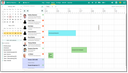
Project calendar at a quote
For service cases the resource planning board is the default tool.
Properties of the project calendar
- It displays all "project-specific" appointments, tasks and phone calls (no correspondences) of the internal project team. The type selection can be changed interactively, however, the client doesn’t save it. Activities opened from the calender cannot be edited.
- The calendar’s purpose is only previewing (read only). It is not possible to select further calendars, only those of the internal persons involved in the project are displayed.
- The calendar ignores calendar releases and and therefore displays the calendars of all staff members involved, even if they have not released their calendar.
Note: If no activities are assigned to a project participant, this contact does not appear in the calendar.
- The initial time window of the calendar can be set:
Start and end are determined by the first and last open activity of the process. If there are no open activities (e.g. for cases in the past), the list of completed activities is examined. The client limits the time range to a maximum of one quarter in order not to overload the display with very long time periods.