Letter, fax and email

In most cases, you will create letters, serial letters, faxes, or emails as correspondence from a contact or from the contact area of a case, which will be sent to selected recipients. When you create a new corre­spondence, a record with all the relevant information of the correspondence (e.g., recipient, contact person, type of the correspondence, etc.) is created in the correspondence management.

The relation to cases and persons is automatically derived from the corre­sponding form when an activity is created, but can also be specified via the selection dialog. Emails can be composed, edited and sent directly in the email form.

When creating a correspondence activity you can differentiate between incoming and outgoing correspondences. After creating an activity, the correspondence can be edited as an email, fax or letter. Personalized emails are created with an email template and can be instantly sent from the CRM server, even in HTML format.

Info

Admin: Your administrator or customizer can adjust the correspondence status, delivery type, mailing type and advance disposition according to your requirements.

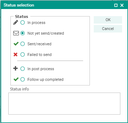
Correspondence status for emails, letters and faxes

Status

Comment

Not yet sent / cre­ated

The correspondence was created, exists in the database, but has not been sent yet.

In process

The correspondence is currently being processed, write access is not possible.

Sent

The correspondence was sent by mail or electronically.

Sent / received

The correspondence is declared as received and checked in to the database.

In post-processing

Follow-up activities may have been created for the activity. The status can be set manually if there are follow-up activities.

Undeliverable correspondence. This status can only be reached with outgoing correspondences from the "Sent", "In post-processing" and "Post-processing completed" statuses.

Correspondence status

Note: In exceptional cases, the administrator can reset a final correspondence status (received/checked in, sent). This allows them to correct wrong address details, or delete the text (file) of the correspondence, so that the user can create the text from scratch. If required, also the creator can delete the whole email.