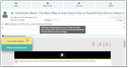
For security reasons, images that are loaded via an href HTML attribute are normally not displayed, i.e., blocked in emails. When selectively importing emails via the Connector, a prompt appears asking how the blocked references should be handled. If the import is done via the job, then external references are retained, but are only displayed as dummy images.
In the mailbox and in the email master form, such images and other resources that are to be reloaded are first displayed as dummy images in the email. You can reload them by means of the security button.
The button for reloading is offered not only in the mailbox, but also in the email master and detail forms, allowing you to download the images afterwards (e.g., when browsing a project).
When replying, forwarding etc., the image references are adopted.