You can open the Entry Portal as a separate browser window or tab from the Sales/Start/Entry Portal menu.

The Entry Portal
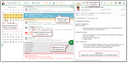
Entry portal
The Entry Portal is meant for your daily work. Primarily, it represents an activity list in which your tasks are displayed, optionally for one day, one week or one month. You will usually only see the open (not finished) activities for which you are responsible (the person responsible), or for which you temporarily act as a substitute. Also, all participants of a phone call (including, for example, team members) can see open phone calls in their respective Entry Portal. If you are a participant of an appointment (also as a member of a team responsible), you can see this appointment in your Entry Portal.
Managers can view the Entry Portal (the activities) of their employees. From the Entry Portal, you can also easily switch to other calendars or the CRM mailbox and vice versa.

Note: The Entry Portal doesn’t present correspondences. The ones that have not been sent yet can be found in the Drafts view of the The CRM mailbox.
As everywhere in the CRM, the Entry Portal uses classic or compact lists. Using the transparent tab in the list, you can toggle between the compact view of the records and the classic list view.

Entry portal toolbar
Chronological sorting in the list
The default sorting of activities in the Entry Portal is chronologically ascending. The oldest (e.g. longest open or escalated) activities are therefore at the top. You can then sort them individually using the sort function depending on the view.