You can have reports, as for example data sheets, technical specifications, or quote documents generated via the print function.

Printing reports and data sheets
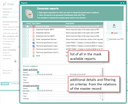
Selected report with corresponding search conditions
Also, in the Entry Portal or in the My Data form, you can have a report on due activities of an internal person issued (see more in Tips on using activities). This function opens a print dialog for reports (report manager) in which you have these possibilities:
Selecting the reports to be printed from a list
You can have several reports generated one after the other. The overview ensures that no report will be forgotten if, for example, several documents (calculation sheets, technical specifications) need to be created for quotes.
Individual report configuration
You can, for example, select individually which details a company data sheet should contain next to the company master data (activities, documents, contacts, products, …). In addition, you can filter these lists by important criteria (from - to, status, type, subtyp, …). This allows you to generate meaningful reports that only contain the data you actually need.
The report manager supports you with creating the standard data sheets from the most relevant master data masks, and also printing quote documents in the sales module, as well as helpful reports about the modules.

Admin: Your customizer manages the definition of the available search fields for the report configuration in the Report Manager, as well as the type of report output, which masks the Report Manager supports, and which elements are available in the search conditions.
Formatting in reports
Reports evaluate the elements according to the template used (search conditions). If a report should have formatting, you can create this in the relevant elements (e.g. note field) using HTML markup.