The function bar

The function bar can be found on the right-hand side of every form. If it is not there, click the transparent tab on the far right of the form. Alternatively, you can use the "hamburger menu" or the View menu.

Docked bars can be hidden dynamically and then docked again via the hamburger menu. The little pin in the corresponding bars should be helpful as well.
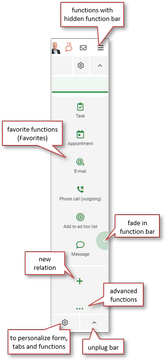
Among other things, the function bar provides several functions for creating new related records. All data required from the source form is automatically transferred to the new record, which saves a lot of typing. This way, you can also create a variety of activities, e.g. for generating letters, creating emails, making phone calls or appointments.

The toolbar is divided into three areas:

  • Favorites - frequently used functions in this form
  • Create new relationships - for creating associated records
  • Advanced functions - contains all the other features and also functions of the active sublist, if these exist.

The favorites in the function bar can be customized, see How to personalize the user interface.

Function bar