Access protection for records is ensured by the access control of the basic system, PiSA cubes. Access protection makes it possible to define account policies for individual users or groups directly for a record. This is usually limited to the owner of the record.

Protection of records
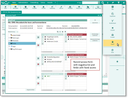
Access mask for records

Admin: By means of the PSA_CST_ACC_GRP_DLG environment variable, the customizer can display the record access mask without a negative list for standard users. This makes it easier to manage basic record access.
See also: Protection of records
Who can edit access attributes?
When creating a record, the current user automatically becomes its owner. Only they can modify group account policies in the access form. All other users are not granted write access to the permission definition.
If the owner restricts their own permissions for a record, these restricted permissions are valid with one exception: While the user is not allowed to modify or delete a record locked for them, they can still read it.
Note: When copying a record, the account policy of the source record is not copied. Only the new record owner who made the copy can change its account policy.
Records without read access
If no read permission is granted for records, the users concerned can only see the corresponding entries in forms and lists as asterisks (*****) in the subject.
Admin: Towards the maximum number of data records that can be loaded into a mask, readable data records might be displaced by non-readable ones. To prevent this, set the variable PSC_VIS_ACC to n. This causes records without read access to not be sent to the client and thus to not be displayed there. Additionally, the variable PSC_VIS_ACC_DTO = n can be used to not load inaccessible records into the DTO at all. The variable is only effective if PSC_VIS_ACC is set to n.