This feature provides access to the history of the previous work in the CRM by logging all objects that are created, edited and hyperlinked, and displaying them in a list.

Last used objects
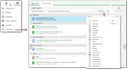
Form "Last used"
Command:
- Menu Sales/Start/Last used
- Desktop sidebar, bookmark below favorites as hyperlinks with folders as an interlevel (Today, Yesterday, Older)
- Last used filter selection
From the Sales/Start menu, a classic list of objects can be opened where the date and time of the last use can be seen. You can search via the Quickfinder (default: title). A restriction to objects follows the same mechanisms as in the EUREKA search. The entries have QuickView, Select functions and can be opened via a hyperlink in the corresponding master form.
Desktop sidebar
In the desktop sidebar, entries are presented as individual hyperlink nodes that immediately display the corresponding object in the form.
New filter
The overarching "Last used" filter (favorite in the filter selection) can be applied in any context, e.g., in the selection dialogs for a task or a document.
Job
In the CRM standard, the Clean up recently used objects job ensures that the list is manageable and at the same time that a minimum quantity of recently used objects remains available. This ensures that users who rarely work in the system can also access a recent history. Adjustments can be made via parameters.
Logging
- Logging is applied to objects that are displayed via unique object-related functions, such as an individual unique record opened via the Open in form function from a result list or overview list, or an entry selected in the selection dialog and opened using the Properties function.
- If a record is changed or inserted in a top dialog (insert for create), this record is also inserted into the list.
No logging
- Objects created in the CRM via a service (e.g. mail import, document import via Pocket, etc.).
- Objects that are not indexed in the EUREKA administration (e.g. questionnaires or resources). However, additionally included objects are also indexed and thus logged as last used objects.
- Records found via the Quickfinder in a result list.
- Several objects marked in a list and displayed via the Open in form function.
Tip: Objects from recent sessions can be opened from the list if the state of the open dialogs of a session could not be saved when the session was closed (e.g., because of a crash).
Hint for the admin / customizing
Logging and listing of recently used objects is based on the EUREKA search administration list (Administration/Tools/Search and Find/EUREKA Search: Objects), i.e., not on all objects.
Last used objects are identified during a session and stored, spanning across sessions, on the server, including a timestamp (insert and update timestamp), for a certain period of time.
In the existing pre-fetches, the last used objects are additionally loaded. This only takes place if the "normal" pre-fetch did not find any data.
Logging is done asynchronously and therefore captures the opened objects in a timely manner. By means of a tab switch to the list, the result can usually be seen immediately.
Deleted records that were logged are also asynchronously removed from the history.
"Clean up recently used objects" job
Using the parameter MAX_TIM:=$TIME-1M MIN_CNT:=20, you can define the interval for cleaning up (the default is a calendar month), and how many entries are to be kept at least. This ensures that users who rarely work in the system also have such a history available.
"Last used" filter
This filter is provided by a script as a favorite. It uses a macro and can therefore also be adapted for your own filters. In addition, when creating a new standard user in the user administration, the creation of filter favorites can also be configured via the template.
Note: If there are no filter favorites, this filter will always be applied initially, which may cause an empty result list to be shown. This can be fixed by using "Clean" or changing to "no filter".