The field service often uses Microsoft Outlook or some other groupware to manage contacts and tasks. For this reason, JustRelate CRM offers a communication interface that also allows managing emails and contacts by means of a mobile groupware, and synchronizes them regularly with the system (groupware synchronization).

Groupware synchronization
§ GDPR: Groupware synchronization enables you to capture new persons in the CRM from your groupware. When doing this, you must observe the GDPR and privacy! See GDPR-compliant registration of persons.
Emails are a form of correspondence for JustRelate CRM and can therefore also be created as correspondences via the activity management.
Correspondences of the email dispatch type can be created from cases and contacts. They can contain attachments that are sent together with the email. When created from the CRM, an email can be edited in the groupware and is automatically checked in to the CRM database as a correspondence. Of course, you can also edit (HTML editor) and manage emails completely in the CRM.
Emails that you receive as a user in your groupware can also be checked in (synchronized) as separate correspondence records in the CRM. This usually happens automatically, and the emails can be managed in The CRM mailbox.
Contacts
The field service has the possibility to match contacts between the CRM and the groupware using the groupware synchronization. This process can be initiated from the CRM as well as from the groupware. If you synchronize one or several contacts, the contact information is matched and updated. When contacts from the groupware are synchronized, a distinction is of course made between private and business contacts if they have been marked accordingly, or are managed in a separate folder.

Attention: JustRelate CRM as a system always has the master status. Contacts (delete, edit, transfer etc.) and activities should always be managed in the CRM. Individual contact information can be transferred via synchronization from the groupware to the CRM. The communication between the CRM and the groupware is always a writing process, data is never retrieved.
Groupware to CRM (persons)
Field mapping in MS Outlook
- The main address in the CRM becomes the business address in Microsoft Outlook.
- The private address becomes the private address in Microsoft Outlook.
- If neither the main address nor the private address in the CRM has the postal flag, the address with the postal flag in Microsoft Outlook will be filed under "other address".
In Microsoft Outlook, there are always main, private and postal addresses. The latter can be of any Type in the CRM.
Synchronize
The Synchronize command in the groupware always synchronizes all data records of a folder, selected data records within a folder, or an opened data record with JustRelate CRM. In this process, the up-to-dateness of the data records in the groupware and the CRM is compared, and the data records updated most recently are synchronized.
Synchronizing in the groupware means:
- Synchronize folder (e.g. special folder "Contacts" in Outlook = all contacts in this folder, private contacts must have been marked as such).
- Selective synchronization (marked contacts from the contact folder)
- Synchronizing an open contact (single contact from contact window)
The matching is done according to a standard:
- If the contact does not exist in the CRM, it will be created.
- If the contact exists in the CRM and has been currently changed in the groupware, there is a security question whether it should be overwritten in the CRM.
- If a contact has been deleted in the CRM, it will be automatically deleted in the groupware on the next export from the CRM without prompting.
- If a contact was deleted in the groupware, this has no effect in the CRM.
- Activities (tasks) of a contact are not transferred from the groupware to the CRM.
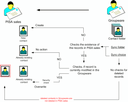
Contact data synchronisation from the Groupware
CRM to Groupware (persons), export from contact form
Note: You should export contacts to the groupware only in exceptional cases (JustRelate CRM is the master). You can export individual contacts from the CRM as VCards and save them in Outlook if required.
As the synchronization of contacts between the CRM and the groupware can be subject to various company-specific regulations (e.g. exclusion of internal contacts, contacts that are managed as internal contacts but do not work with JustRelate CRM, etc.), it is advisable to organize and implement automatic contact synchronization together with the responsible JustRelate project engineer.
The Groupware Connector also synchronizes contact data from the CRM to the groupware. This feature is available for Exchange Server 2010 as well as Exchange Online as part of Office 365. In the standard, it synchronizes the respective user’s external contacts with her or his groupware account.
- The connector synchronizes all external CRM contacts of an internal employee (account manager) with the default contact folder of the groupware account.
- In order to exclude contact records of the groupware from the synchronization, additional own contact folders need to be created.
- The connector uses an intermediate table, "Contacts - Contact ID in Exchange". The table contains additional attributes to identify when and for which internal employee an external contact was synchronized.
- The contact synchronization job is
GRW_SYN_CON_EXP. The parameters are documented in the job administration. It is recommended to copy and parameterize the default job.
- If a contact does not exist in the groupware, it is created there.
- If a contact exists in the groupware but was modified in the CRM, it is changed in the groupware (JustRelate CRM is the master).
- If the contact exists in the Groupware and was modified there, a security query follows whether it should be overwritten in the groupware.
- If a contact has been deleted in the CRM, it will also be deleted in the groupware the next time it is exported, as specified in the groupware configuration (My data).
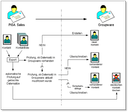
Synchronization of contact data from the CRM to the groupware
Advanced settings (Admin)

Admin: Your administrator or customizer can adapt the behavior of the groupware synchronization according to your requirements.
She or he manages the list of objects deleted in the CRM since the last synchronization, which have been logged in order to check which objects can be deleted there during synchronization with an external system. This ensures data consistency during the next synchronization.
Specifying groupware folders for the synchronization
The folders that should be synchronized (Outlook or Lotus Notes, ...) can be configured in the My data form. If this has not yet been done, JustRelate CRM will request that this assignment be created at the first attempt to export to the groupware.
Note: If you set the "Apply as default" checkmark in the dialog, then the folders will not be queried again the next time data is exported from the CRM to Outlook.