The contact relations of a company or a person are displayed concisely on the Additional data/Contact relations tab. Here, all types of contact relations of the current contact are displayed.

Change of name, contact relations, contact history
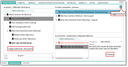
Contact relation with history at a company (expanded Additional data tab)
For an external company, a competitor, or a person, the Contacts relation tab offers
- a tree representation of the corporate structure like in the corporate group browser, and the relation of the current person as an employee in the companies listed,
- a tree (can be toggled as list) with the type of the relation or role of the relation with contacts (companies/persons),
- the tree representation of the history (predecessor/successor).
Role of contact relations
- Changes to the contact relationship (n:m) affect the contact component in the head of the mask. The behavior is comparable to the main project behavior in activities.
- Changes at the component exchange the roll-like relationship.
- Emptying or deleting the component in the contact relationship list causes another contact with the same role to replace it.
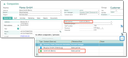
Role of contact relation at the company with expand button for the list
Example
A sales partner has not yet been entered in the master data for a company. If the user maintains a sales partner in the contact relationship list, this contact is now automatically entered as a component in the header.
If the user deletes the sales partner in the contact relationship list, which is also visible in the master data as a component, the component is supplied with the next contact in the relationship list that has the sales partner role (if available).
Also at the internal staff member, at the own company / internal department you can find on the Contact relations tab
- a list with the type of the relation or role of the relation with another contact (other companies/persons),
- the list of the assignments of the internal staff member to internal units,
- the tree representation of the internal unit structure in internal units.
Note: The contact relations of a person (in the Additional data tab) are displayed read-only as a tree. Thus it is possible to trace relations beyond the assigned contact of the first level, like on a network. The role is displayed at the node. Using a toggle button, the original list can be opened. Only the list view allows you to create or delete contact assignments.

Attention: An internal employee node cannot be expanded, preventing in particular the accounts of colleagues from being presented.