With JustRelate CRM, addresses can be entered for objects of many types (persons, companies, business opportunities or inquiries, quotes or requests) and can be used for various purposes (main addresses, delivery address, invoice address or location).

Entering international addresses
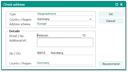
Address assistant with address schema and automatic address check
For entering addresses, the CRM provides you with an address assistant. After selecting the country or its address scheme, the assistant offers just the fields necessary for the entry concerned. A selection, for example the country selection, is automatically adapted to the scheme or is restricted. Thus, entry errors are minimized, and it is ensured that the information created from the address data, for example for the window of an envelope, always comply with the international standard.
Automatic presetting of the country for new contacts or addresses
Usually, sales staff members create contacts (lead, sales prospects) in the country they work in. When creating an address, its country can be automatically preset to the country of the internal staff member.
The country entry is determined from the main address of the currently logged-in internal staff member. If not maintained, the 9-level structure of the own company is browsed upwards for a main address that includes a country. The country then found is used. When creating an address, it is set as the default.
Note: However, this doesn’t take place with CSV-, Groupware, or cardscan imports, nor with loader procedures.

Admin: The server feature can be activated through the PSA_SFR_ADR_DFV_CTY variable. It defaults to 'n'.
Checking for available address dates
The address assistant also checks for already existing addresses if the address category of a contact is to be modified. The Mail flag in the address field can be set only for one address type in each case. Then this type is automatically used for correspondences. When using several addresses, you can find a list of further addresses in the Addresses tab (additional data). Here, correspondences can also be created immediately.
Note: If you open a contact form or refresh it, the main address of the company is always displayed, irrespectively of the mail flag. In this way, the system prevents other address types from being changed inadvertently.
Country displays in the envelope window
The country is never displayed in the envelope window of a contact, because it is added depending on the country of the sender and the recipient only when producing the correspondence. If both correspond, no country is printed on the letter, in accordance with international practice.
If the sender and recipient are in different countries, the English-language designation of the country appears on the letter.
Admin: The PSA_CPD_ADR_CTY_LBR variable controls whether city and country are separated by a blank line. The default is that no blank line is inserted. The variables PSA_CPD_ADR_ZIP_UPP and PSA_CPD_ADR_CIT_UPP let you control whether the location or zip code or both are to be capitalized.
Access to addresses
The contact addresses types inherit the access consistently from the contact. This means that addresses receive the access from the contact for which they are created or to which they are copied. When changing the access of a contact, the access of its addresses are changed as well. This ensures that a user only receives write or delete access for a contact address if those access permissions also apply to the corresponding contact.
Automatic address check using a database or web service
For Germany
The address management (address assistant) of contacts can optionally be connected to a zip code database for Germany.
When you edit addresses using the address assistant, entries (address, street, zip code, city) are automatically checked. Suggestions for wrong or missing entries are made or immediately filled in if unambiguous. When you close (save) the assistant, the address is checked, and you are notified about potentially wrong street names, house numbers, zip codes and city names.
Admin: In the CRM administration, addresses for contacts and sales cases can be checked globally in the database and, if needed, be fixed using suggestion mechanisms.
Web service
JustRelate CRM has an interface to a web service. By default, it is "MapQuest" for geocoding and map display. The web service serves as an alternative to the German address CD for German addresses. This provides a suggestion option (no validation) for address checking by means of integrated geocoding.
The service suggests address data but does not have real-time information available, so no validation can be expected.
Note: To use the web service, a product key is required. The service can only be used with an internet connection. Using the external service causes data to be transferred via this connection.
Admin: The Suggestion button in the wizard uses the geo-service if no address CD is installed. For suggesting, a different service can be set using the PSA_ADR_RCM variable.
By means of the variable PSA_SFR_ADR_LOC_FND_AUT [y], the service tries to calculate the coordinates when the address wizard is closed. The corresponding job [PSA_ADR_LOC_FND] searches for addresses without coordinates in the CRM and lets the web service calculate them.
The Administration/Contacts/Addresses/Address administration list offers the possibility to display all addresses and limit their use to "Contact", "Project" and "Service Object" (Relationship quick filter). The administrator has the possibility to specify coordinates and to have address components suggested.