Contact postprocessing

For quickly capturing and creating contacts in the JustRelate CRM App, business card recognition (BC recognition) is available. For recognizing BCs offline, the local JustRelate business card scan app is available, and if you are online, an external web service (ABBYY, CAMCARD) can be used.

Contact postprocessing has been developed primarily for the field service to be able to quickly capture and sub­sequently create qualified contacts in the CRM. If time allows, the field service can already correct the captured data in the CRM app, and, if online, perform a duplicate check and clean-up. If there is no time for this, they will mark the contact as Postprocessing necessary for the back office or for themselves. The "Contact Post-Processing Wizard" (CPPW) is available for postprocessing in the enterprise system.
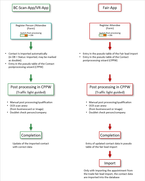
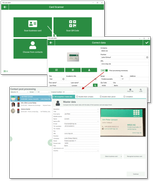
Schema contact post processing

In the CRM web client, contacts that are in post-processing can be checked in the CPPW for poten­tial duplicates. You can correct contact data, and optionally also merge contacts to save them qualified in the database.

Business card recognition in the CRM App

The functions for business card recognition (BC recognition), marking for post-processing, and duplicate check and cleanup are provided

  • in the business card recognition app (BC scan App) in the contact area,
  • in the visit report app (VR App) at the visit report of an appointment,
  • and in the Fair App at the Fair report.

Business card recognition can be run offline (local JustRelate business card scan App) or online (external web service, ABBYY or CAMCARD).

If a company is captured for a person at the same time (e.g., automatically when the business card is recognized), then the company and the person are created as separate contacts and automatically combined.

Capturing a contact from a business card, marking it for postprocessing