If you change or correct data (except the address) in an external contact form, the CRM checks this data also in the assignment of the person to the company. When the changes are Saved, the system automatically offers you to adjust the updated data for the person or company assignment. For this purpose, a dialog automatically appears, showing the modified and the current data.

Synchronizing external person company data
Note that staff members are synchronized only with their main company (Company field in the contact form), even if they also belong to another company. Without a main company, the synchronization dialog does not appear, although these staff members can be seen under the other company.
Also, if you change the status of a company that has staff members with a final status (e.g. locked) then their status won’t be changed when synchronized with the company.
In both cases, you can synchronize the data if required at the click of a button, or continue working without adjustments. The check itself can be deactivated for extensive changes.
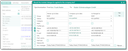
Synchronization request when changing person data
You can decide which changes are to be applied in the dialog by deselecting or overwriting changes if necessary. The dialog always shows you a preview of the data that is applied after confirming with Yes. No closes the dialog without applying any changes.
Note: Changes to a person’s address are not matched with the company, but changes to the company address are matched with the company’s staff members.
Transferring company domain name changes to staff members
A domain name change made to the company email address will be transferred properly and conveniently to the staff members. The following rules apply:
- If the company and the person have a correct email address (includes @), then for the person only the text after the @ is replaced with the text after the @ of the company email address.
- If the person has no correct email address (no @), the entire company email address is applied as stated in the synchronization dialog.
Deactivating the synchronization dialog
If you activate Never ask in the synchronization dialog "Synchronization of person to company", all subsequent changes to personal attributes carried out by the same user are no longer applied to the company. Also, there will be no corresponding query anymore. For this, the CRM creates a user-specific variable, PSA_SYN_PRS_ORG, which is set to "n".
If you activate Never ask in the synchronization dialog "Take over the values of company", all subsequent changes to company attributes carried out by the same user are no longer applied to the company's employees. Also, there will be no corresponding query anymore. For this, the CRM creates a user-specific variable, PSA_SYN_ORG_PRS, which is set to "n".
You can find these variables in My data/Configuration/My settings.