The classic region administration in the CRM can manage and assign sales regions. Initially, this territory assignment in the form of regions is maintained by an administrator.

Sales regions and sales area distribution
By assigning an account manager to sales regions, a new captured company contact with its corresponding attributes is automatically assigned to this account manager. Existing companies are redistributed automatically or by means of a corresponding function to the account managers when attributes have changed.
You can open regions from the browser tree in the CRM or directly from the region field of an company.
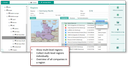
Multilevel regions
Regions
- can be coded and
- structured as desired,
- display a colored graphic card view of the region and subregions,
- have regionally assigned companies,
- have a region account manager,
- can have a region manager assigned (informative).
Region coding
The regions can optionally be coded
- by country,
- according to zip codes and country,
- by Geo code (NUTS key).
Note: Due to the zip code format, please note the limitation to zip codes in Germany, Austria and Switzerland.
Automatic change of the region
If the address or the country is changed for an existing company contact, the system automatically checks the assignment of the appropriate region. If a declared agreement is found, the company is reassigned to the appropriate region if necessary. This feature is controlled by the PSA_CON_AUT_REG environment variable.
Depending on the setting of the Territorial allocation flag for the company, this automatism can also automatically lead to a change of account manager for the company if the region is changed.
Automatic sales region allocation

Attention: The territorial allocation is based exclusively on the main address of the external contact.
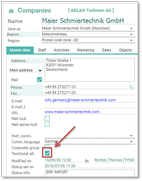
With this option activated, the sales region is assigned automatically.
The account manager is automatically assigned
- if the region or industry according to the area distribution table changes,
- when the Distribute function in the area distribution is used,
- when using the Assign company function in the region.
This feature can be switched on and off using the Territorial allocation flag of the external contact.

Admin: In addition to the company flag, this feature is controlled by an environment variable:
PSA_CON_AUT_TER_ALC ("automatic territorial allocation activated?", values y | n, Default n). The variable PSA_CON_AUT_TER_ALC overrides the effect of the flag with the value n.
Manual assignment of a different sales representative
If an external company should be assigned a different sales representative (account manager) opposed to the sales region distribution, this can be achieved by selecting this sales representative in the company form.
Please note: To ensure that the responsible sales representative of a company no longer adapts to the sales region distribution, even if the sales regions are redistributed, deactivate the Automatic sales distribution flag.