CTI stands for Computer Telephony Integration. The integration in the CRM makes it possible for the telephone system to communicate with the IT infrastructure. The phone number of a contact plays a central role.

CTI integration with contacts and activities
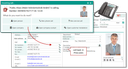
Basic principle of an incoming and outgoing call via CTI
Calling by mouse click and one-click-call
The phone fields of the contact records in the CRM have a function for accessing the CTI interface. The phone number is obtained from the contact's data field, transferred via the CTI interface to the phone system that initiates the outgoing call via the internal telephone network. The CTI integration also works for systems that don’t identify phone calls via a call ID.
Phone numbers are available as a hyperlink, in particular also in contact lists and contact sublists. Clicking such a hyperlink directly initiates a phone call to this number. The business phone number is favored, but this is queried.
The Call function (function bar) as well as phone buttons offer a list of the contact’s phone numbers for selection.
For CTI telephony functions of internal contacts, the phone number list also contains the speed dial, if it was provided. Using speed dialing can save telephone costs, as the call is only switched internally and is not routed through the telephone provider.