You can carry out all processes for the production, registration and qualification of contacts using the contact management. Using the activity management, contacts can be continuously developed and qualified. Initial contacts (so-called lead) are transferred on successful qualification directly to a case.

Qualifying contacts by status and activities
Qualification
The systematic qualification of contacts up to an order sometimes requires extensive activities in the form of tasks, appointments, phones call and, of course, correspondences. In every contact form, you can find functions for generating activities to this contact. You can manage activities in the Activity management. There, documents and additional data to the activity can be managed as well, activity series can be put together, the processing status of the activity can be determined, and the responsibility managed or delegated. Independently of activities, you can transfer the contact according to the current situation immediately to a project or case, or associate it with some other contact group.
Sales case and status
When registering and saving contacts (persons and companies), a sales case is activated that contains automatically defined standard activities for this process. The respective sales case corresponds to the Contact group (e.g. lead, sales prospect, customer etc.). Next to standard activities from the process definition, the account manager can create additional activities and delegate them to other staff members.
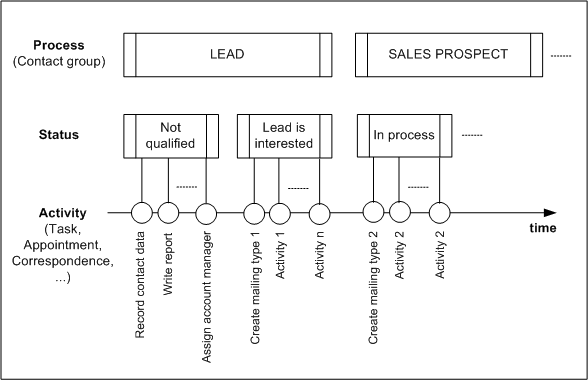
Qualification of contacts in the sales case
Within a sales case, several procedures are processed that are managed as a contact Status. The contact is qualified through the Status and the activities linked to it in the form. With a status change within a sales case (contact group), activities that were defined by the administration for this sales case can be automatically initiated. Since different sales cases (contact group) can contain different procedures, the status of a contact directly depends on the selected contact group.
The status of a contact also determines its weighting. Those contacts that no longer need any special attention on account of their status in a sales case, are indicated in color. Such statuses can be: Inactive, Locked, Competitor’s product in use, and similar ones.
Note: On every status change, you should maintain the Status info field in the status dialog, so that reasons for or additions to the status change are taken down.
In the activity list of the contact or the activity overview (Sales / Activities / All menu), you can see the activity history. You can recognize the done status by the check mark in the Status field of the activity list. Here, an activity of the task, appointment and phone call type can also be marked as done by clicking the symbol.

Admin: Your administrator or customizer can adapt sales cases, statuses and standard activities according to your requirements.