Using the View menu, you can open an additional browser bar that displays next to business sectors (product line) and industries also corporate group and region structures. These can be opened directly via a hyperlink from within the browser tree. Structure sheets in the browser as well as entries in the management lists are provided as hyperlinks. This allows you to operate interactively between companies and regions.

Corporate group and region structures
Corporate group structures
Note: To be able to view a corporate group in the browser, the Corporate group flag must be set in the Additional data subform of the first-level company. The browser features the known refresh function (Load) [F5].
If the corporate group flag is set, the company is shown in the browser on the first level under the general group node. You can create corporate structures (in the Additional data/Contact relations tab) for every company, no matter whether the group flag is set or not.
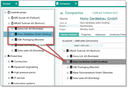
Structure of a corporate group in the browser
In the browser, the group structures are displayed in a tree view. Clicking on a structure sheet (company) opens the company form. Corporate structures support up to 8 sublevels and are displayed in the browser.
Drag and Drop
In the browser, companies can be reorganized using drag and drop. Drag and drop is also supported for moving the company mask into the browser bar and vice versa. In both cases, the moved company loses its parent unit and is integrated into the structure of the new superordinate unit.
Region structures
If the administrator has created regions, they are displayed in the region browser and can be used for sales regions and sales area distribution.
In the browser, the regions are displayed as a structure in a tree view. Clicking on a structure sheet (region) opens the Regions management form in which, next to the subordinate regions, also the companies are listed to which these regions were assigned.
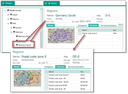
Browser for regions

Admin: As an Administrator, you can create individual regions via the Contacts/Regions administrator menu in the Regions form. The Structure tab lets you assign regions or create subordinate regions.