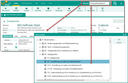
In the browser bar, all available industries are accessible via a hyperlink. This allows you to open the Industry form using the hyperlink from the browser. The industry assignment is shown in the Companies tab, which can be either directly assigned or unfolded in subindustries. This enables, for example, marketing staff members to determine the industry assignment of companies also across all subindustries, and to create corresponding distributions lists.
The Sub industries tab lists all subindustries of the current industry in the form heading. The upper industries can again be reached using the hyperlink in the Category 1 or Category 2 fields in the form header.