Status | comment |
|---|---|
Planning / Open | The appointment is being planned and is saved as Open in the database. |
Firmly agreed | The appointment is firmly agreed and will take place at the agreed point in time. |
Taken place | The appointment has taken place. |
Not taken place | The appointment has not taken place and must be arranged again if necessary. The reasons for this can be specified. |
Rescheduled | The appointment was rescheduled for some other point in time. |
Canceled | The appointment was canceled. No new appointment will take place. |
In post processing | You may have created a follow-up activity for the activity. The status can be set manually if there are follow-up activities. |
Post processing completed | The activity including all follow-up activities is completed. |
Delegated | The responsibility for the activity was transferred to another staff member. |

Appointment status
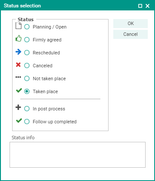
Appointment statuses
Synchronization – additional information
Appointments can be synchronized in both directions by the Groupware. In case of synchronized appointments from the CRM into the Groupware, the attendees are informed via email from the Groupware.

Attention: When exporting appointments to the groupware, additional information can be output before the closing body tag. The additional information is suitable for notifying internal appointment attendees but should be removed or checked thoroughly for appointments with external attendees.
See also: JustRelate CRM Groupware Connector: How to notify in a correct way
Automatic reset of the attendee status on appointment changes
If the location, beginning or end of an appointment is modified, then you can specify by means of a variable that specific appointment attendee statuses are reset. In the CRM standard, these are all non-final statuses (confirmed, no reply, declined.). This results in all participants for whom one of these statuses is set being automatically prompted to agree again after a change of location or date.

Admin: The variable PSA_APM_MOD_CLR_CON_STA lets you specify the appointment attendee statuses to be reset if the location, beginning or end changed. For this, enter the identifiers of the activity contact statuses that should be reset.