The Save as template wizard can be used, for example, to save existing email texts as a template for later use. This is useful, for example, if a mailing is to be reused with slight modifications at a later date (event invitation, info about new products, etc.) or if you simply want to use an individualized email template.

Store email, letter or fax as a template

Attention: Saving as template is only possible for email texts based on the new HTM template. Saving with placeholders is possible from emails that have not yet been sent and from emails that have been sent but is subject to the following requirements:
- From sent emails only if they were sent with "Send directly".
Explanation:
Placeholder fields are normally removed during the email is sent and replaced with the data. Only when sent with the "Send Directly" function, the placeholder information is retained in the email text.
If, on the other hand, the email is generated in the groupware, none of this will happen. - By the way, the email header generated when "Send directly" is automatically removed when the template is saved.
The Save wizard
With the function Save as template you open the wizard, which offers the following options:
Create new template button (copy template in wizard, adjust name and save as new template).
Classification of the template by Scope and Topic and labeling as a Favorite so that the template can be found more easily later in the selection tree.
Control access on the template via "Access only for me" checkbox
ON = Template gets the status "in development" internally. You can therefore modify and test the template later.
OFF = Access for my department (access string customizable). Template gets the status "Released" and is initially provided and used as it was copied. The record access is set to Own company for Groups with read permission, so anyone can use the template.
Tip: The new function "Save as template" is also available on letters/faxes. Saving is only possible for letters/faxes based on a Word mail merge template.
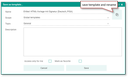
Wizard for saving your own HTML templates
Note: Always rename the template right away. When naming the templates, it is helpful to use a name that helps to clarify the purpose of the template and thus to be able to assign it clearly in the template selection.
If you have saved an HTM template as a new template, you can customize it or edit the content in the Simplified Template Management.
See also: Templates, Quick info for the simplified correspondence template as PDF