The staff member to whom an activity was delegated will find it in their Entry Portal. The processing status (e.g., Delegated) can be recognized by the corresponding status symbol. To process the delegation, the activity must be opened in an individual form, and one of the Status options must be sez.

Status of delegated activities
Delegation status
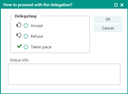
status of delegated activities
Status | Description |
|---|---|
Accepted | The recipient has accepted the responsibility for the activity. The delegating person of the activity is automatically informed, and the processing status needs to be maintained by the recipient of the activity. |
Refuse | The recipient has refused to take responsibility for the activity. The delegating person of the activity is automatically informed, and the processing status must be maintained further by the delegating staff member. |
Done / Taken place | The received activity has already been completed and was assigned the respective status from the recipient. The responsibility only remains with the recipient if the delegation originated from a team. |
Refused and accepted activities
As a default in the activity form (Additional data tab), the staff member who delegates an activity is informed whether the activity was accepted or rejected. These settings can be deactivated.
On rejection of an activity, the delegating staff member is automatically informed by means of a message. At the same time, the information is stored in the My messages list.