You do not need to subsequently set the empty condition, i.e., "no dependency data". You will find it indirectly in the 1:n nodes.

Negating conditions in a 1:n search for depending data
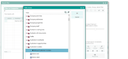
Negated 1:n relation
No relation data (x)
Find all items that don’t have a 1:n relation at all.
This immediately also affects the already existing 1:n queries of the corresponding node (entries are removed automatically from the search list).

Attention: Filters are optimized in such a way that a negated 1:n search no longer checks whether 1:n data records exist at all. Thus, the option "with EMPTY relationship data" is now automatically included in every negated 1:n search.
The JustRelate CRM standard includes the "My customers without appointments in the last 6 months" filter at the company. Due to this change, this filter now also shows customers without any activities.
If you use filters that prefer the previous behaviour, e.g., filters such as "Quotations without open tasks", the new implementation would also deliver all quotations to which no tasks are assigned. To these filters, a condition needs to be added that excludes this. Normally, this is the same condition, but including the relationship data and the corresponding search condition.
Without relation data (flag)
Find all items with 1:n relation data where no record in the relation list meets all specified search conditions.
Without relation data can be set directly in the editing area for the selected entry and is marked in the search list as a strikethrough entry. Setting the attribute (flag) refers to the 1:n relation as a whole. Here, other search entries in the linked data class are irrelevant.
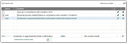
An entry without the named relation data (strike trough) and an entry with the relation data.
Note: 1:n search entries can only be combined with OR inside the linked object. In other words, search entries belonging to 1:n-associated objects are always AND-connected to search entries that don’t belong to this object.