All user-visible filters of the current mask are displayed in the filter administration, replacing the list of filters from the administration menu.

Filter administration and filter favorites
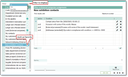
Filter administration
You can open the filter administration using the pulldown at the funnel icon in the menu bar, and then…
- select favorites for the filter selection of the current mask as needed by setting the flag,
- hide or show fields or columns in the left list using the known context menu at the column headers (for example, show "result list" field),
- clearly display filters using the View menu,
- copy or delete the selected filters, or set their access using the Edit commands,
- edit the selected filter directly in the administration form,
- set the user level for the current user.

Attention: Favorites set in overview lists also affect the tree of system filters in the desktop sidebar, for example. You will then see only this one filter on the corresponding leaf in the system favorites tree.
Filter favorites
The sometimes extensive filter selection list of a data record can be adapted and displayed more clearly using filter favorites (defined in the filter management).
After refreshing or reopening the corresponding mask, only the favorites that have been marked as such in the filter management will appear in the filter selection.
The display of favorites in the filter selection list can be temporarily reset to display all available filters using the command (last line in the Show all filters selection list).
Note: If you hide favorites, this is only temporary. The favorites selection is displayed again after refreshing, i.e., reopening the mask. Filter favorites also have an effect on the filter selection in a selection dialog if the corresponding data object is used.
Global filter management

Admin: The filter definition data for filters in the currently open dialog can be viewed and edited in the global filter management (see Searching and finding). A filter is always saved for the underlying DTO, meaning that the filters in the global filter management are restricted to the respective DTO. The filter management also offers the option of setting and managing access permissions for filters globally, i.e., release filters of employees who have left the company, or invisible filters, etc.