• Operation
  • Launching JustRelate CRM
  • Exiting JustRelate CRM and storing the work status
  • Desktop integration
  • The user interface
  • The function bar
  • The Entry Portal
  • Masks and forms
  • Lists, classic or compact view
  • How to personalize the user interface
  • Selection dialogs for relations
  • Standard data editing
  • HTML editor
  • Printing reports and data sheets
  • Last used objects
  • Chronos history
  • Searching data using the Quickfinder
  • EUREKA full-text search
  • Using filters
  • Creating and using a filter
    • Functions and user levels
    • Collecting query conditions
    • Linking several 1:n queries
    • Type-specific entries as a flexible selection
    • Negating conditions in a 1:n search for depending data
    • Interactive sorting
    • Saving, copying and setting access
    • Filter results list
    • Filter administration and filter favorites
  • Tips for working with filters
  • Messages
  • Snapshot
  • List of hotkeys
  • Maintaining your own data and configurations
  • Protection of records
  • JustRelate CRM Documentation
  • Operation
  • Creating and using a filter
  • Linking several 1:n queries

Linking several 1:n queries

Different values of the same attribute are collected in the search list, and it is searched across the entire list (e.g., for all registered skills), always top-down.

This way, questionnaires can be analyzed as well. For example, "search for customers who gave a particular answer to question A as well as B in the questionnaire ".
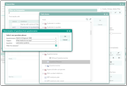
Link of several 1:n queries in the filter

JustRelate
  • About us
  • Career
  • Contact us
  • Our partners
Products
  • Email Builder
  • Web Builder
  • CRM
  • Marketing Automation
  • Portal
  • CPQ
  • Analytics
  • Services
Resources
  • Events
  • Downloads
Legal
  • Imprint
  • Transparency Center
  • Privacy Policy
JustRelate Logo