Similar to the fair assistant in the marketing module, an assistant for creating a visit report is available for appointments.

Creating and distributing visit reports
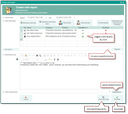
Visit report assistant
The assistant supports you with:
- Automatic registration of the person responsible for the appointment in the distribution list
- Adoption of statuses set in the appointment as an icon (participation flag).
- Correcting the time
- Additional capturing of external and internal contacts, teams, and distributions lists
- Final processing of the attendees (participation flag can be set with different statuses) and of the distributor in a list (Distribute Yes / no). Distributing to internal staff members and teams.
The Distribute function breaks up all teams and departments beforehand, resulting in messages to individuals. This prevents an appointment from being found as unread even though a team member has already read the report. - If you know that all participants participated in the appointment, use the All participated button instead of toggling their status manually. But even afterwards, you can still toggle the participation flag of individual participants in the wizard.
- Questionnaire: Selecting and filling out a questionnaire or several ones. The system remembers the last completed and saved questionnaire and automatically offers it in the questionnaire selection field when the wizard is called up again.
- Maintaining the notes field
- Checking the attachments
- Status change (automatically to "taken place" or "in post-processing", if the appointment status was not final already)
- Intermediate storage of appointment processing (Save and Close)
- Final saving of the visit report and closing of the appointment (Finished Button) and the distribution of the appointment by means of a message to the selected internal staff members (Distribute flag). If the appointment still has open follow-up activities (e.g., automatically generated ones from the questionnaire), its status can only be set to "in post-processing".
- Additional or later modifying (notes, participants, etc.) and distribution of the appointment to further persons by opening the assistant once again (also for finished appointments), as well as extension of the distributin list by the desired persons.
Who can create visit reports?
Attendees
Regardless of their role in the appointment, every internal appointment attendee can create the visit report for an appointment, close the appointment, and also distribute it. This makes it particularly easy to document synchronized external appointments.
Non-attendees
In addition, the use case is supported so that, for example, employees of the person responsible who did not attend the appointment can enter information in the visit report and complete and distribute the appointment. Depending on the person's access permissions to the appointment, access can either be granted by the process, or the person responsible explicitly grants write permission. Without access, the function is rejected.

Admin: Only the write permission for the appointment is checked, not that of the person responsible, creator, administrator or participant. The deletion permission of the organizer is not affected.
Distribute to all internal staff
The Distribute to all internal staff function includes the initiator of an appointment and also adds the logged-in user to the distribution list, so they can also comment on the visit report later on. The Quickfilter selection Distributor: My ... returns only those appointments in which you are not the responsible but only listed as a distributor.
The My unread reports filter in the overview therefore displays all the reports in which you are entered as a distributor.
Refreshing a visit report
If a report-relevant field (whose content is evaluated by the visit report) is modified in a final appointment with a generated visit report, then the report is deleted from the activity (appointment) after a corresponding message has been issued. You are then prompted to generate a new report, i.e., to refresh it. For this, there is a Refresh button in the top right corner of the Visit report tab.
A visit report is only subject to automatic updating once it has been generated by the person responsible for the appointment using the visit report assistant. This prevents incomplete reports or reports that are still in the concept phase from appearing in the system. Once the visit report has been generated, the appointment will have a spectacles symbol (report completed) in the appointment overview list, otherwise it will not.
Tip: The field can be used for defining filters and watchlists, e.g., "show all appointments for which no visit report has been generated" (search condition: RPT_SET_PIC = '').
Note: Report-relevant fields are all those that are included in the template loader. Among others: Assignment and deletion of follow-up activities, assignment and removal of document relations, changing or deleting contact relationships, the key fields of the components (for contact, main project, responsible). The template loader for visit reports is defined in the variable PSA_ACT_QST_RPT.
Admin: Customizing allows you to control the distribution to fixed teams or internal staff members in the assistant. For questionnaires, one can write an action userexit. If needed, please contact your JustRelate project partner (release notes 07.00-20160331).