Main classification

For classifying activities, a compact classification dialog (Classify button) is avail­able in the master form as well as in the email and appointment connector.

To an activity, only one main classification, but several additional classifications can be assigned, .
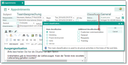
Classifying and structuring activities

Classification as customer communication

The "customer communication" classification is set automatically (job: PSA_ACT_RFR_CST_COM) and makes it easier to find all the activities (meetings, phone calls and correspondence) with a customer contact (external contact).

  • These activities receive as Additional classification the default entry Customer communication.
  • If no external contact is involved and the job is running, the Customer communication flags will be automatically removed.

In an activity overview list, you can find in the  Type quickfilter the selection Customer communication, among others.

Info

Admin: The job "Activities: Update customer communication" checks whether these activities are associ­ated with external contacts, and removes the classification again if not. Using a parameter, the job can also add this classification if it is missing even though external contacts are associated. During an upgrade, activi­ties are checked, and the classification is set where appropriate.

Note: It is recommended to have the “Customer communication” flag set by the job instead of setting it manually.