The turnover probability is controlled by the status of the sales cases. According to the qualification of the cases, a probability in % is assumed, which is included in the calculation of the expected turnover and the turnover probability together with the status. The selection and use of the statuses depends on the workflow.

Status and type of sales cases
Note: You should maintain the Status info field in the status dialog for every status change, so that reasons for a status change or additions are captured.
The status of sales cases also determines their weighting. Those sales cases that no longer require special attention on account of their status are highlighted in gray. Such statuses can be: quote lost, inquiry uninteresting, no potential, telemarketing Prematurely canceled, project done and others similar to those. Cases with a final status, e.g., quote won and qualified to order and similar ones are highlighted in grass green.
If a case is ... Lost to a competitor in the course of processing, the corresponding competitor record is selected from the competitor relation (Additional data tab Competitors) in order to record the lost cases also in the competitor management.
In the standard, the CRM provides various statuses for the classic sales process, which represent a workflow with a percentage probability of sales.
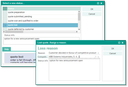
Example status selection in the quotes

Admin: Your administrator or customizer can adapt sales case, statuses and standard activities according to your requirements.
If the status is set to ... lost, you can specify the loss reasons in a separate dialog. Here you can specify your individual loss reasons or select them from the given entries, as well as the competitor you lost against. If you specify a competitor, their project role in the case changes to “Competitor has won the project”, and the role of the other competitors in the case changes to “Competitor has lost against a third-party”.
Loss reasons don’t appear in any form because this field is not always filled in, and also not in the sales overview, because it plays no part in contracts. It appears as Loss reason on the sublists of business opportunities and quote management in the last field on the right-hand side, i.e., in cases that can be lost.
The other text that can be entered in the modal dialog below the loss reason, is the "status information" to the status of the sales process, which can be overwritten here.
Subtype of the sales cases
Sales cases can be classified and categorized more clearly by means of a subtype (Type field). You can find the field in the sales forms and in the overview lists, as well as in the corresponding sublists of the companies and persons.
Admin: Your administrator can define subtypes that are then available for selection in the Type field.