Quantity explosion

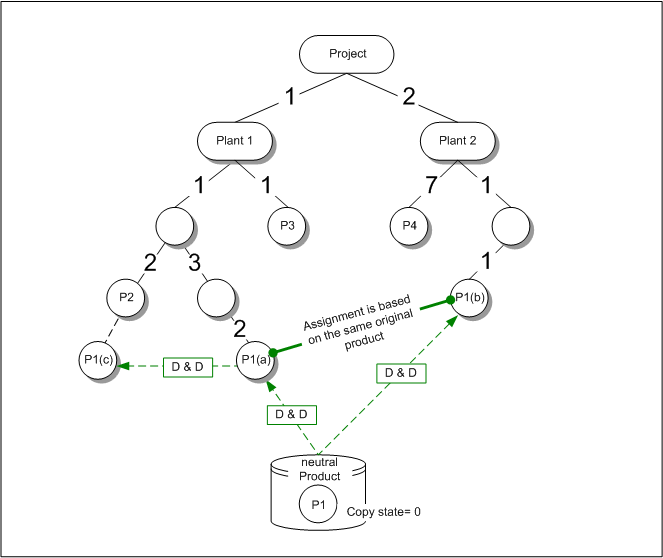
Exemplary product structure with indication of quantity

One important function for planning material requirements is the quantity or bill explosion for edge quantities. In every structure level, the quantities are determined for all components appearing there.

For products with many components, totals records for the demand can significantly speed up the requirements planning run and thus the ordering process for components.

Quantity explosion can be performed across all production steps up to the purchase of additional material.

For every new order proposal of a module, the list of valid parts is determined and exploded in the planning run. For every module required for the production of the product, the demand, i.e. the required quan­tity, is determined.

The scope of supply of a case (quote) typically consists of several structure levels. In the first product level, there are [unit 1] and [unit 2]. In every unit, products are integrated in different quantities. The quantities are edge attributes of the scope of supply.

Copy status at the neutral product master

From the neutral product database, you can integrate the same article several times into a case-specific product structure, which can be done using drag and drop, for example. The article is either copied or referenced according to the copy status setting of the neutral article. If the copy status is set to 0, totals and single sets can be generated.

Quantity explosion

To analyze the demand planning, the articles are displayed in a list as the totaled demand after the scope of supply has been determined.

In the Quantity explosion list (sales case form, additional data), all sheets of the case-specific product structure can now be exploded and displayed. This does not apply to the nodes. The structure of the total scope of supply is exploded, where the nodes are extracted. The list then only shows the sheets (articles) of the structure with the tree quantities.

Tree Quantity of the articles in the case

By default, the list shows the Accumulated on original products view in which not the tree but only the Cumulative Tree Quantity (CT Quantity) is displayed.

In the CT Quantity field, the total quantity of all single edge attributes of the structure trees is displayed. The articles that were associated from the same master in the case (original product) are not displayed as a single tree quantity, but are accumulated as a CT quantity.

The Tree Quantity and at the same time the Cumulative Tree Quantity are determined by means of the Calculate tree quantity function. If the scope of supply has been specified, this function must be executed to determine the demand.

From the example given above, the following would arise:

Article

CT Quan­tity

Tree quan­tity

P1(a)

8

6

P1(b)

8

6

P2


2

P3


1

P4


14

In the above table, the CT Quantity and the Tree Quantity are shown both as an example. With the Accu­mulated on Original Products view, the Tree Quantities are hidden.