You can get an overview of the Products/Services grouped in Sectors via the Products and Services database menu. In sales cases, you can assign the scope of supply directly to a business line browser.

Product and service selection using sectors
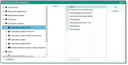
Case-specific products via product selection in business lines
- Open a sales case, switch to the Configuration subform.
- If you click the Add from product line button (Ctrl+2), the browser dialog for product lines opens.
- To the left, you will see:
- First level: Product line
- Second level: Product (article)
- Every other level: Structure of the product (recursive)
- Click twice on a sector level to the left to display all products of the sector. Double click an article to open its structure. To accept single products or products with complete structures, select the corresponding level. You can mark only one level.
- Click the Add button to save the selected entry. Add products successively.
- Click OK to accept your selection.
- Make the required changes to the record (number of pieces etc.).
- Save the case!
- In the Selected field, mark the positions you would like to include in the calculation of the case.