Container and assembly parts list

A matrix parts list supports, for example, easy planning of supplies for mechanical engineers.

  • Container and assembly parts list for configuring highly structured products in mechanical engineering.
  • Quick creation of complex structures when using assembly groups or supplies several times.
  • Arrangement of assembly groups or supplies in a container.
  • Collection of products that are to be used, clipboard for mechanical engineers.
  • Definition of the quantity usage of assembly groups or supplies for single assembly groups.
  • Easy copying of quantity definitions to other assembly groups or supplies.

The objects serve to simplify the creation of product structures that have repeatedly used units. The units can be put together in the container and then added to the product structure via a copy function.
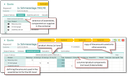
Procedure

  1. Place products in the container (units).
  2. Open the assembly parts list, choose the required product from the scope of delivery (1st level).
  3. The first column displays products from the container (units), all further columns are the sub-products (2nd level of the scope of delivery).
  4. Specify unit quantities for every sub-product, then save.
  5. The extended structure can be viewed in the scope of delivery.
  6. Copy function: Copies the quantity of one unit onto another (e.g., if a pump is to be treated like the container).

Collecting units and adding them to the product structure

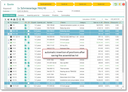
Added items from the assembly parts list

Quantity explosion function

  • Automatic calculation is only possible for cases that are not yet concluded, otherwise manual calculation is required (button in the modal window).
  • Display of the result in the modal window, automatic calculation of the tree quantities (cumulative tree quantity).
  • Combine same positions, deactivate → tree quantity (quantity per unit or assembly group).
  • Convenient Excel export.

Calculation

  • Navigation: Automatic calculation (during input, when leaving the field), or when saving the list via the drop down at the scope of delivery.
  • The product tab of the calculation group shows all products that are calculated together with the current group (case-specific and neutrally).
  • The core data of the calculation group is always displayed.