The Read function opens a dialog that lets you selct the import file (Excel or CSV).

Reading in data
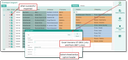
Contact import form with mapping list and history
OK reads in the data from all non-empty columns of the Excel file into the import table. The import table can contain up to 50 columns.
- For error corrections, all columns are writeable.
- For mass corrections, you can use the keyboard shortcut Ctrl+R (transfer content), e.g., to conveniently change the language parameter "DE" to "German".
- Read in data can be deleted from the import table using the Delete import table function.