The mapping table in the right area of the import form has two columns: Default column title of the import file, and mapping selection of the PSA fields.

Mapping fields
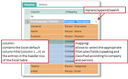
Mapping table to configure the field names for the CRM
Configuring the mapping
The additions to the column Mapping entries in parenthesis mean:
Replace/append
These two mappings are offered for the company (comment) and person description. They allow you to receive available information in the description fields already when updating.
Search
During the import, a person or company with an identical entry is searched for. If a record is found, the system sets an assignment. If no record is found, a new person or company record is created, and an assignment is created as well.
This way, when importing contact persons, the mapping of the company name with the field "company name search" can already recognize available companies and assign the corresponding contact person.
The mapping selection entries can be maintained in an administrator table (Administration/Data exchange/Contact import mapping menu). Project engineers can add customized fields here.
Colored representation
For a better overview, mapped columns are already marked in color in the import table and in the mapping table.
- Green: Company data
- Orange: Person data
- Blue: Address data
If mapped fields of an area (company, person, address) are blank, no record is created during a subsequent import.
Administer mappings
The Select mapping function lets you save mapping settings under a name, as well as apply already saved mapping templates to the read in data.
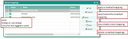
Processing/managing mappings
After Applying a saved mapping, a message appears on how many columns were successfully mapped. A record with a white background in the mapping table indicates that the column could not be mapped.
In such a case, no corresponding field exists in the CRM for the affected columns of the import file. Then try to map the corresponding data into an alternative field. If this data does not conform to the CRM at all, an "auxiliary field" such as "Description/Comment" can be used.