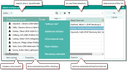
Multiple-selection dialogs correspond to the specific relation being created (contacts, cases, or documents). You can create new records with the desired relation from the selection dialog or directly in a module form. New entries are always inserted at the start of the right list, ensuring visibility even in a full list.
For document selection dialogs, a paper clip button allows checking in local documents, automatically creating a document record and associating it with the relation. The Archived button displays only archived documents, and additional filters are available in the Filter field's select menu.