With single selection, only one data record is selected and transferred to the relation field with OK.

Single selection
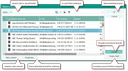
Selection dialog for assigning a single record
Empty field contents
If the character length of an entry in the hypertext field of the form is too long to place the edit cursor in it with the mouse, the single selection dialog can also be used to comfortably delete the entry (not the record) in the corresponding field. After that, a suitable record can be quickly selected from the selection menu in the field by entering a character string.
To do this, open the selection dialog for the field (button in the field) and choose the Empty field contents function in the selection dialog.
If you move to the hypertext field using the Tab key, you can empty the field contents using the [Delete] key.