Multiple selection menu for comma-separated entries.

Multiple selection menu as a check box dialog
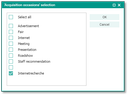
Check box dialog of a field
In some special fields, the field selection menu is offered as a multiple selection checkbox dialog. It allows you to collect several field entries as comma-separated values in one action in the destination field. Such fields also have a button that opens the selection menu as a dialog.
Example: Contact form field Occasion (allows including several entries as comma-separated field content).
How to proceed:
- Open the pull-down menu of the field as usual.
- Mark one predefined entry or several ones and confirm with OK.
As a result, all entries marked in the check box dialog are now contained comma-separated in the field.