Workgroup Fileserver

If employees at remote locations or branch offices work with the CRM client and are connected to the central application server via VPN, it is not very efficient to view or check in documents directly on the central server (due to the usually low bandwidth of DSL connections).

For these users, a workgroup file server can be provided as a separate module for working with documents. It offers the following advantages:

  • Efficient exchange of documents between company headquarters and subsidiaries (VPN connection).
  • Local intermediate storage of documents.
  • Reduction of the data transfer between client and application server (only transmission of changed documents between file server and application server)
  • Automatic adjustment of different document versions between the locations.
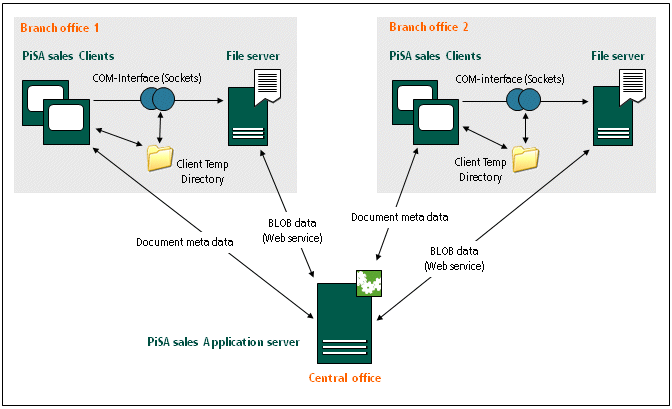
Communication between application servers in the company headquarters and a file server of the subsidiaries

File server definition for departments and staff members

In the Own company, Internal departments and Internal staff members forms, the administrator can find the Select Fileserver function. It opens a dialog in which the file server can be selected. In addition, the configuration data from the file server table are displayed in the dialog.

The file server configured for a staff member has precedence over the departmental file server. This allows individual employees to use any other file server, independently of that of the superordinate department.

Info

Admin: For information about, administration, installation and configuration of the Workgroup Fileserver, please refer to the Overview in the Administrator section.