You can see the status of a document in the Status form field. The status determines the life cycle and processing status of a document.

Document status
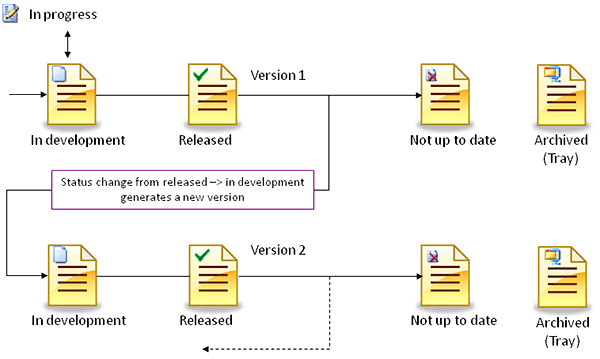
Life cycle of documents
Status person

Attention: Note that every user can change the status of a document that is in development and not in use. On status change, the status person is also changed. The original creator of the record may be excluded from a further status change because she or he no longer is the status person.
Now and then it can be necessary to classify documents with the status Archived as Not up to date. Attachments in checked-in emails, for instance, are automatically given the Archived status. If required, the administrator as well as the author can change the status back from Archived to Not up to date. This also causes these documents to be not displayed in selection dialogs any more, for example.
Tip: On the other hand, you can search for the status in the selection dialog and thus find, e.g., released documents quicklier.
| Status | Comment |
|---|---|
| In development | As long as a document was not approved, it is In development. Every user who can access the document according to the role concept can access, use and edit it in this status. |
| In process | The document is in process if it is currently being used by a user (checked out temporarily for processing). The In process status indicates that at this point no write access to the document is possible. |
| Not up to date | Such a document is no longer valid and cannot be selected with objects. The validity date lies before the current date. The record is marked in color in the overview lists. Every user in the ADMINISTRATOR group can reset the final status, or reset a document that was inadvertently left in process. As long as the document is not in use (assigned), the status can still be reset by the current status person (reset released document). To edit a Not up to date document that is already being used, a new version must be created. |
| Released | A document is released if it is not being processed any more. It is then published. Every user who can access the document according to the role concept can set the status to Released. Every user in the ADMINISTRATOR group can reset the final status, or reset a document that was inadvertently left in process. As long as the document is not in use (assigned), the status can still be reset by the current status person (reset released document). To edit a released document that is already in use, a new version must be created. |
| Archived | A document can be archived if no other status applies. Documents that are created in the process of checking in a mail, or from checking in via the selection dialog of the document, are automatically in the Archived status. When the status changes to Archived, the document is compressed and the validity is set to "Now", if it lies in the future. Archived documents have a reduced function bar.They cannot be edited any more, but be set again to In development by a user belonging to the ADMINISTRATOR group, or by the status person (who most recently changed the status). |

Admin: Your administrator or customizer can adapt the document statuses according to your requirements.
Note: Archived documents can be filtered via a defined selection filter (Archived / Not archived) or searched directly using the Status field.
Status control for document structures
If the status of a master document changes, the new status can be transferred to the publication document. The following rules apply: If the new status is set to released, not up to date or archived, then the system browses the structure for documents with the same number, version and language. If the system finds such documents, the same status can be given to them after confirmation.