See also: Service accounting

Managing the service response
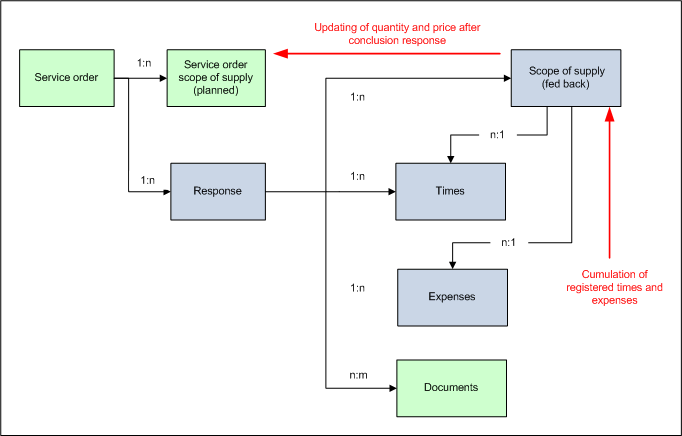
Service response concept
Note: Your own scope of supply of the response are realized using PSA_REL, not a PSA_ART_STR.
Status-driven creation and presetting of a response
With all PSA_SVC_ORD_... service orders except the PSA_SVC_ORD_PRT spare part order and the maintenance order, the status change to planned causes the crePrcOb function to create a response and assign it to the service order. The name is adopted from the keyword, the start and end date from the project start and end of the service order. The function parameter specifies the automatic presetting of the scope of supply of the response, as well as the times and expenses table:
ART:=KEY_1, KEY_2, KEY_3,…HOU:=KEY_1, KEY_2, KEY_3,…EXP:=KEY_1, KEY_2, KEY_3CON_RUL:=SVC_TEC
CON_RUL is the role of the personnel in processing. For any staff member found, copStdArt generates a set of hourly and expenses records as specified in HOU:= and EXP:=. These are usually the registered service technicians (from the processing personnel list of the order). Extensions are possible by specifying further personal roles (e.g., additional service engineers, SVC_ING).
Likewise, a pre-filled accounting sheet is assigned to the service order if a service call appointment that has a service order as its main project and has service objects and human and technical resources assigned to it reaches the released level using the planning board.
If the same appointment is released two or more times (e.g., if the appointment release has been reset), another accounting sheet is now generated and assigned, regardless of whether the status of the service order changes or the operation is released more than once! The attributes of the settlement sheet are adapted to the changed appointment.
There are no "invalidated" settlement sheets.

Admin: For example, by setting the variable PSA_ACT_CRE_PRC_OBJ_STY to the activity subtypes MAINTENANCE_ACTION,SVC_ACTION, you can achieve that the activity generates an accounting sheet for a maintenance and service operation when released. Duplicates are prevented in this process.
In the standard, presetting is applied as follows:
Scope of supply of the response: TYPE: = PSA_EFF, PSA_TRV, PSA_EXP
Presetting like for the scope of supply of the service order, so that billing can be applied to the planned dummy items. The quantities are calculated.
If the additional parameter ART_ALL =Y, all products included in the service order are automatically inserted in the accounting sheet. This can alternatively also be done manually. For this, a button function is available in the product list of the accounting sheet (Apply products/services from project) by means of which products from the order can be selected and accepted.
Times: HOU: = PSA_TRV, PSA_EFF, PSA_TRV
Generates hourly data sets in the specified order for every internal staff member with the "service technicians" role, including a reference to the items in the scope of supply of the response.
In detail, these are:
- Two travel time records (position 1 and 3) with a reference to the position
PSA_TRV(travelling time at cost), - One working times record (position 2) with a reference to the position
PSA_EFF(service per effort)
For easy registration, the times are preset with data from the service order as follows:
- Travelling time (position 1) = From the appointment beginning to the beginning,
- Working hours (position 2) = From the appointment beginning to the end,
- Travel time (position 3) = From the appointment end to the end.
Expenses: EXP: = PSA_EXP CON_RUL: = SVC_TEC
Generates an expenses record with a reference to the position PSA_EXP (expenses) for every internal staff member with the "service technicians" role.
Integration of the signature pad for service reports

Attention: Along with the release of JustRelate CRM 7.5, the support for the signature pad (Signopad) was discontinued. If it is still in use, the library can be provided again.
Requirements:
The server must be able to access the DLL "STPadJava.dll". It should be located in a folder named "lib" which is on the same level as the Jar file. Optionally, the path can be provided by means of a system property (-Djna.library.path=lib).
In the server property file, the following values must be set:
psa.pdf.sig.ks: Keystore for the signaturepsa.pdf.sig.ks.pwd: Password for the keystorepsa.pdf.sig.ks.alias: Alias in the keystorepsa.pdf.sig.ks.alias.pwd: Password for the alias
Variables:
PSA_BIRT_HOM= Path to of the report engine of the BIRT runtime environmentPSA_RPT_FMT_CLS_BIRT= Controller class for BIRT templates
Analogously to the other reporting tools, the functions in the template management (edit, create new, view) can be adapted using this class.
Storing the appointment ID in the service response
If an accounting sheet is created for an appointment, the PSC_GID of the appointment is written to its new field PSA_PRC_OBJ.ACT_GID. This is an important customizing requirement for providing functions for defined deleting or tracking/post treatment of response sheets after rescheduling service action appointments.