Process definition

Overview

Creating a contact or a case in your company usually is a defined process, because further activities and tasks must follow with respect to this contact or case. Processes like these are all objects that are edited and qualified through hierarchical procedures and activities. This does not only apply to sales cases and projects, but also to marketing actions and, next to leads, to competitors, suppli­ers, sales partners etc.

The workflow of these processes is usually based on procedures (cases) that are based on activities, which are tasks, appointments or correspondences, etc.

For example, Standard activities are automatically assigned when the first contact (lead) is created, which describes how the contact should be qualified or how the case should be processed. Defined standard activities always arise, if a process is initiated in the CRM, to which these activities are assigned. If the activ­ities are processed, a new procedure is specified in the process, e.g., when the Status changes, and new or changed standard activities connected with this process are assigned. Which standard activi­ties are assigned with which process status, and which status a process shall have, is defined by the process definition.

Please do not confuse standard activities and activities the user creates in the course of a sales case (tasks, correspondences, appointments, phone calls etc.). Standard activities are the actions or directions specified in the process definition, according to which a sales case needs to be processed based on its process status.
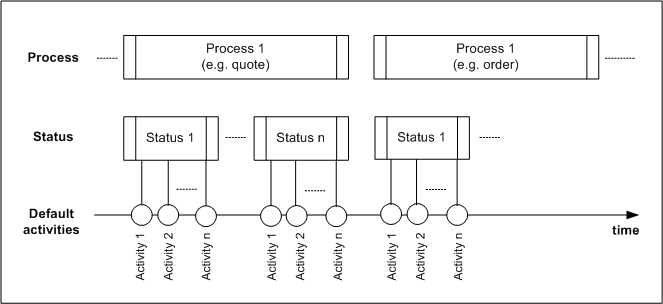
Sales case, process status and activities

Attention

Attention:  You can adapt and create process statuses and standard activities for processes. You should create new processes for cases only after you have become familiar with the CRM data model. Contact categories as a process can be created for person contacts.

Process definition form

As an administrator, you can find the class / process / sequence / activity assignment in the Process defi­nition form. You can display the processes and linked process states (procedures) and activities here. You can also adapt standard activities for the different process statuses, add new ones or delete them. Also, standard escalation levels are defined that trigger a defined operation when an initial case status (escalation) is reached, for example the notification of responsible staff members.

When opening a process, an overview form is available to you, which displays all process statuses and their standard activities in the form of a tree. Here you can immediately see and edit all data and entries of the process statuses and standard activities.

A single click on the top icon in the overview tree and a click on the button Explode suffice to display all process statuses and the connected standard activities. To edit entries, simply click on the respective icon before the entry to mark and select it. The tabs and edit fields change accordingly in the right half of the overview form.

Alternatively the subform In general is available, which manages all attributes as a list.

Important attributes of the process definition

Class

Class objects for which processes are managed. For example,

Class

Meaning

PSA_ORG

Contacts (external companies)

PSA_PRS

Contacts (external persons)

PSA_PRO

Cases (sales cases, marketing actions)

Process

Title of the process