The case pinboard of an object can be used for entries in the course of the project. These posts are arranged in chronological order and are not structured.
Users can follow this pinboard. As "followers", they automatically receive a message on every new entry. This cannot be changed. Only the setting who is entered as a "follower" can be controlled by means of a variable, PSA_FLW_PIN_BRD_RUL.
All changes to the project pinboard tracking affect the automatic entries but not the notification and the messages.
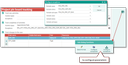
Project tracking adds project data tracking to the pinboard. It lets you track specific fields to have the changes made to them documented on the pinboard.
In the form, you can specify the processes or changes that should trigger a system notification on a pinboard for cases:
- On creation of activities for the case,
- when activities of the case are finalized,
- on changes to the case itself.
When creating or finalizing activities, you can configure next to activity types also exemptions by explicitly excluding or including cases, statuses or subtypes.
To track changes to the case itself (bottom list), select the fields (Field name) and use the function in the function bar to specify the required Parameters.
Based on the configuration, corresponding journal entries are created for the objects concerned, and the system posts configured changes to the corresponding project pinboard.