From the My calls list in the back office, or in My data, function Configuration/CTI, you can configure the behavior of the CTI integration.

Configuring the CTI call log
Please first select the CTI technology. If you are using a TAPI driver, choose TAPI. The configured TAPI connections are then loaded into the Address selection. Usually, only a single address is available. Please select it.
If you do not have an address to select, there is most likely a TAPI configuration error. If the list contains several addresses for selection, several connections are probably configured. In both cases, please contact your administrator for further instructions.
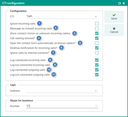
Note: The settings for the options shown above are determined and stored using variables. In "My Settings", you can search for PSA_CTI% and set the corresponding CTI variables directly. It is strongly recommended that you consult your administrator if you are not sure about the settings the variables affect.
- No reaction to incoming calls, and no logging.
- If incoming calls are missed, an internal message is created.
- With incoming calls from an unknown number, a selection dialog will be opened for searching a contact.
- With incoming calls from a known number, the corresponding contact form will be opened.
- Prevents a new window from being opened for calls waiting during a phone call. The call waiting is treated like a missed call.
- Creates a message bubble in the tray area of your desktop.
- No desktop notification and no notification by automatically opening the contact form when an incoming call is received from clearly identified internal contacts.
- Call is logged after the connection has been established.
- Call is also logged if the connection was not established.
- Call is logged after the connection has been established.
- Call is also logged if the connection was not established.
Digit sequence for outside line access
The two variables
PSA_CTI_LEA_ZRO(Add leading 0 for outgoing calls?)PSA_TAPI_EVT_ADD_ZRO(How many zeros does the event TAPI interface add to the phone number?)
can be set so that the number of characters and the characters that also manage an international outside line can be adjusted. For example, CNT: = 1 CHR: = 9 stands for a leading 9 for an outside line (CNT = first position, CHR = the character 9).