Companies and persons can have several predecessors and successors. The n:m relation is displayed as several trees.

The contact history display
Tree representation of the history relation
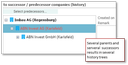
Tree representation with several predecessors/successors
Deleting a history relation
Only the relation with the predecessor can be deleted:
- Mark the current company or person record (bold) in the tree.
- Open the Select predecessors selection dialog.
- Mark the predecessor in the right-hand list and click Remove at the bottom.
Indication of companies and persons with a history
If a company or a person has a history then this is indicated by an icon in the title bar at the top right of the form. You can see the kind of relation in the Contact relations tab. There are three conditions:
- Has subordinated unit
- Has successor
- Has both
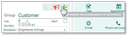
Indication of an existing history
The history view for assigned objects
If a company or a person has predecessors then additionally all objects that are assigned to the predecessors can be made visible in sublists by selecting the History view. This makes it possible to fully trace activities or case histories. The historized assignments are displayed in italics.
The History view is available as a list menu in the following sublists:
- For an external company with marketing, sales cases, project folders, services calls, cases, contracts and objects. The view also shows the records of the predecessor companies. The records of the staff members are not shown.
- For an external person with activities
If the History view is selected, the list first loads the activities of the current contact and afterwards the activities of the predecessor contacts. Then the list is sorted by the due date in descending order.
The historized assignments are displayed in italics.
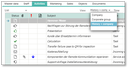
Selection of the history view in the Activities tab