A staff member changes from company A to company B.

Corporate change of a person
Target
Recommendation: This function creates a clean history of the change in any case as opposed to manually assigning the person to another company.
- Execute the Corporate change function for the person.
- Select the already existing company B (Company...) in the corporate change assistant.
- Provide a Change note (can be viewed in the person’s history).
- Specify that the communication data (address, properties) of the person are transferred.
Result:
- The status of the predecessor person is automatically set to inactive.
- The successor person is created and assigned to the company B as a staff member.
- The history relation of the person is built and displayed at the person under Additional data/Contact relations as a tree.
Assistant for the corporate change
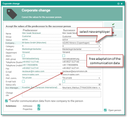
Assistant for corporate change